



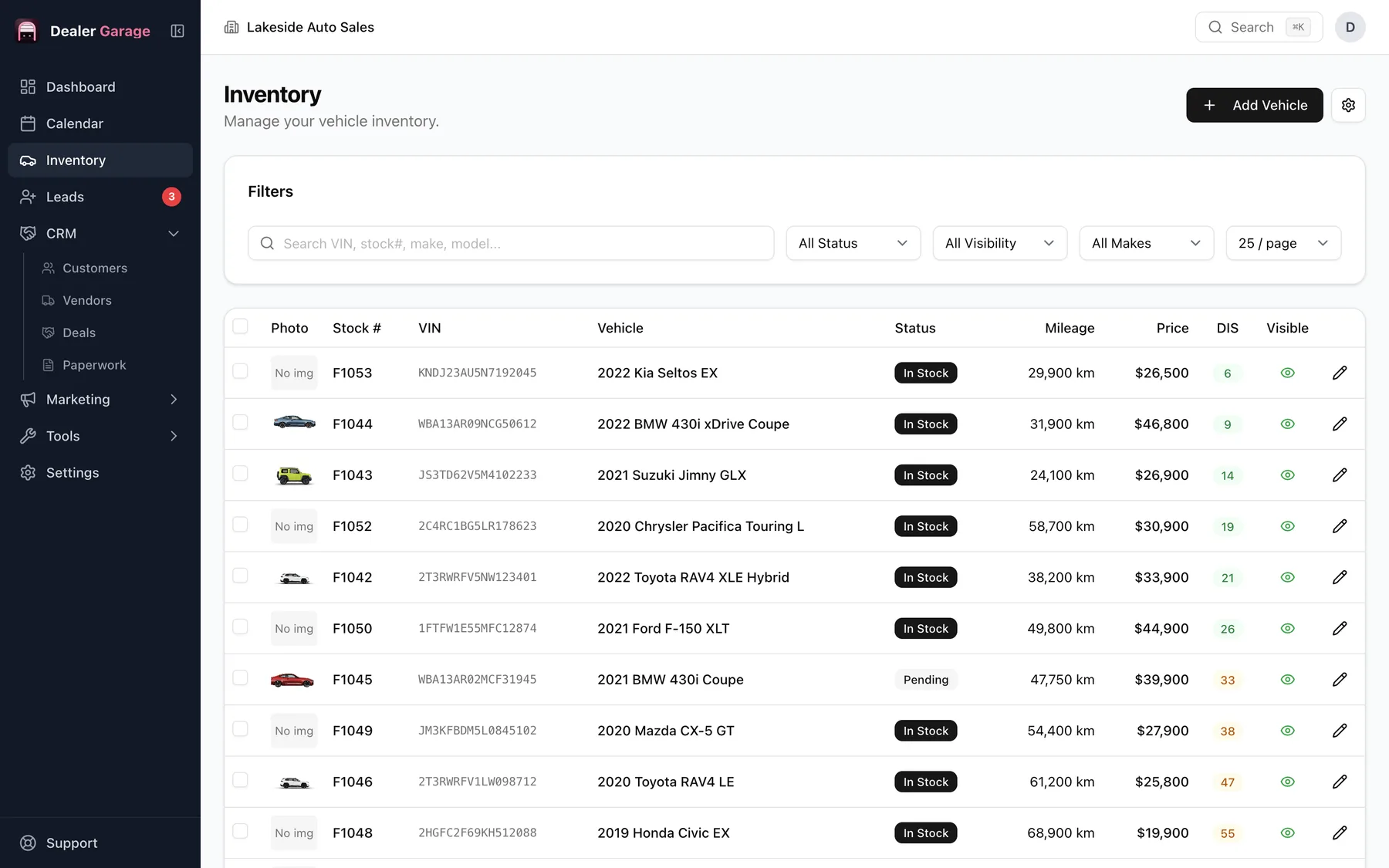
Dealer Garage keeps one record per vehicle: VIN-decoded details, photos, status, every cost line (purchase, repairs, detail, safety) and the gross at list price. You can filter and search stock, share a live stock list on the office network and print a window sticker. It is in the free plan and the data stays on the dealership's computer.
What a vehicle record holds
- Year, make, model, trim, body style, colours, transmission, drivetrain, fuel type and mileage (in miles or kilometres).
- Stock number and VIN, with the VIN decoded for you.
- A feature list and a description you can reuse in listings.
- Photos, kept on the computer next to the database.
- Status: In stock, Pending, On hold or Sold, and a condition such as Used or As-is.
- A cost ledger: what you paid and every repair or service, with the vendor on each line.
Knowing your gross before you price
Add the purchase price and each reconditioning line (brakes at the shop, detail, safety inspection) and Dealer Garage shows what the car stands you at and the gross at your list price. Seeing that number while you set the price is the point: it is easy to forget a $700 inspection when the price is set from memory.
A worked example: bought at $16,200, reconditioning of $1,340, listed at $21,900. The record shows the total cost and a gross of $4,360 at list.
Finding and moving stock
- Search by make, model, VIN or stock number from the global search box.
- Filter the table by status, make, price or age.
- Add vehicles one at a time; VIN decode fills in most of the detail.
- Share a live stock list with people on the office network; see online forms and the stock list.
Printing
Print a window sticker for any vehicle with its specs and features. See window stickers.
Where it lives
Inventory is stored in a database file on the computer where Dealer Garage is installed, and photos beside it. Nothing is uploaded unless you use an online feature such as Marketplace posting. Back it all up to one file with backup and restore.
A morning on the lot
You pick up a trade-in on Friday. You add the vehicle, paste the VIN and decode it, and the year, make, model and trim fill in. You enter the mileage, add twelve photos from your phone, set the status to In stock and record the $9,400 you paid. By the time the car is washed on Monday, the record is ready to print as a window sticker and to queue for Marketplace.
Compared with a spreadsheet
| Spreadsheet | Dealer Garage | |
|---|---|---|
| Specs for a new car | Typed by hand | Filled from the VIN |
| Costs against the car | A column that gets stale | A ledger with vendor and amount per line |
| Photos | Somewhere else | On the vehicle record |
| Window sticker | Rebuilt each time | Printed from the record |
| Who changed what | Nobody knows | Roles control who can edit |
Questions people ask
Is inventory management free?
Yes. Inventory, photos, customers, vendors and the cost ledger are in the free plan.
How many vehicles can I add?
There is no vehicle limit in the plans. Capacity depends on your computer's disk space, mostly for photos.
Can I import my existing stock from a spreadsheet?
Not at the moment. Vehicles are added one at a time, and decoding the VIN fills in most of each record, which makes loading a lot quicker than typing it all.
Does it work without internet?
Yes. Decoding a VIN needs a connection, and everything else in inventory works offline.
Try Dealer Garage
Dealer Garage is installable dealer management software for independent used-car dealers in the US and Canada: inventory, leads, deals, dealer paperwork, Facebook Marketplace posting and email campaigns, with records stored on the dealership's own computer..